Question by: Slim_
Hi guys,
I'm having problems with a footer div touching the main content area div on firefox 3. It displays fine (a margin of about 40px) on internet explorer. I have been breaking my head over this for over two hours, and I have no idea what the problem is. Adding br /'s in between the div's works fine in FF3, but ruins it in IE. Below are the codes for the main content div and the footer div... I also took a screenshot so you can get an idea how firefox 3 is displaying the div's.
//styling for main div
.main {
width:600px;
float:right;
background-color:#3b3b3b;
margin-top:15px;
margin-right:25px;
overflow:hidden;
color:#fff;
padding-left:15px;
padding-right:15px;
padding-top:15px;
padding-bottom:15px;
border:2px dashed #fff;
}
Answer:
A quick look at your CSS. Just add margin-bottom:20px; <-- whatever you want it to be to main div. When styling margin with CSS you may be doing this:
margin-top:15px;
margin-right:25px;
There's no need though as you can use this CSS shorthand property:margin: 15px 25px 20px 25px;
Note:-
15px=margin-top
25px=margin-right
20px=margin-bottom
25px=margin-left
For example (the above case), just write is as:-margin: 15px 25px 0px 0px;
Hope, this helps.
Blogger Question : div's touching, can't seperate them!
Blogger Question : Feedburner says blogspot page feed invalid?
Question by: dslicioutv
Hi,
I'm lightly skilled with blogs. I used a template on my blogspot blog, and am using a custom domain name. I wanted to burn a feed in feedburner, and tried using my custom domain URL and it says it is invalid. I checked with feedburners validator which told me it found a working ATOM feed but with some inoperability. I couldn't find an answer on feedburner or google, and I am only assuming it has something to do with using a custom domain name. I'm simply trying to get my feed to work in feedburner. The website is http://www.ds-licious.tv
Thanks, in advance.
Answer:
There're 2 type of feeds:-
a- Feed on Posts
b- Feed on Comments
Your feed on posts url is http://www.ds-licious.tv/feeds/posts/default/
Copy and paste the above line into their box. Click on the next button. And they will bring you to the next level:-
Hope, this helps.
Blogger Question : Aligning a YouTube video
Question by : iWillToo
I've been trying to align a YouTube video with the left margin of the body text. Using just the code supplied for the video, the image is inset about 30 pixels from the left text margin and nothing I do will budge this image.
I've tried using the param tags, and the img tags, individually, to align this thing to my satisfaction but neither have any effect.
Please, Blogger Forum readers, if you know how to align these things, let me know how you do it.
Answer :
Hope this code will help you to fix the above matter :-<div align="left"><object width="300" height="200"><param name="movie"value="http://www.youtube.com/
v/9EbO2rJXx_E"></param><param name="wmode" value="transparent"></param><embed src="http://www.youtube.com/v/9EbO2rJXx_E" type="application/x-shockwave-flash" wmode="transparent" width="300" height="200"></embed></object></div>
Blogger Question : Picture alignment
Question by: Darren
Hello All!
Newbie blogger here. I have changed the html on the rounders template to change the number of header elements to more than one.
Problem is, I can change the title and description to "center" the text, but I can't do the same for the starbucks image below it. Now that is an element so I am not sure if it is in the "header" or an "element" in the html, in either case, I want to center the picture as well.
Any help would be appreciated!!
Answer:
It's an element. To answer your question, do as follows:-<center><your image url></center>
Hope, this helps.
Blogger Question : Any way to ban a commenter in Blogger?
Question by friscuba
I repeatedly get SPAM comments from Big Bear cabins in California through an Indian ISP they've apparently hired to spam comment travel blogs.
Is there any way I can ban this ISP 122.164.197.# from commenting? Maybe there's some sort of code I can add to my template? If you know of such a code, I'd appreciate it.
Aloha,
Steve
Answer:
http://onlinebiz-my.blogspot.com/2008/04/
blogging-tool-ip-address-blocker.html
Remember, most of the users are using the dynamic ip. Having an IP address that changes occasionally does affect and you need to monitor your list frequently.
Hope,this helps.
Blogger Question : Adding feed to my mainpage
Question by BudapestG
Hello!
I have a google blog (blogger) hosted locally at my webpage. The address is:
http://www.hungarybudapestguide.com/blog/
When I write new articles and news to the blog I would like the title to be automaticly added to my frontpage at http://www.hungarybudapestguide.com/ with a link to the blog and the actual article...
Is that possible with blogger? If so, how?
Thanks a lot!
Answer
Hi BudapestG,
It's possible to do that provided you know AJAX and Iframe. But in your case, there's an easy way out by subscribing to a free RSS Feeds provider which is MY SITE.
You are allowed to re-syndicate and display RSS or Atom feeds of your choice on your website by simply adding a few lines of code.
The result is shown below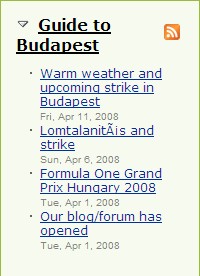
Blogger Question :Allowing Certain Users to Post Topics on My Blog?
All right, what I'm asking is, could I allow users to post topics on my blog, but not have access to my password and username and such? Just be able to post topics. I'm using blogger by the way.
Hi,
You are allowed to have 100 authors for your blog. Here are 3 major steps to follow:-
a- Click on Dashboard > Settings > Permissions > Blog Authors > Add Authors

b- Enter the email address of people you want to add as an author.
c- Lastly, click on "Invite" button

The end result is shown below:-
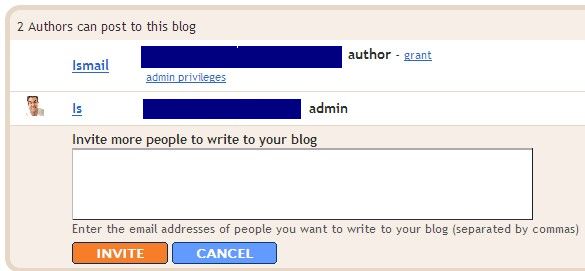
(Note - in your case, once you added him/her as a team blog, don't grant him/her with full open access to admin.
Hope,it helps.
Blogger Question : Nav bar disappears when header is changed
Hey again!
I wont bother you more than this one thread!
New problem:
I had a fab looking nav bar with links then I uploaded a new picture for a header and now the links are gone :( the pic is exactly the same size as my previous one, so I don't really understand what happened.
You can take a look here :
http://templateonline.blogspot.com
(demo site, where I build my templates)
Best regards Mia :)
http://www.bloggerforum.com/modules/newbb/viewtopic.php?
topic_id=22892&forum=2&post_id=93994#forumpost93994
(Note: Anyone uses the above script, please link back to my site.TQ :D )
Blogger Question : Fine In Firefox, Huge In IE
My blog looks fine in firefox but if you view it in IE the font is huge & the layout jumbled.
http://tinyurl.com/4xzlc9
Anyone able to determine what is causing this?
Thanks in advance for the help!
Answer
Let me brief you a bit about FireFox and Internet Explorer. Each browser has their own limitations when comes to Html and CSS. That's why your pages are appearing differently with IE on windows. For example:-
a- the photo image is total to 595px wide. If there is more than 8px of margin/padding, then they won't fit side-by-side in the 600px wide table cell.
b- worst scenario if your are using Internet Explorer, the browser can't interpret the width/height in percentage (%). Check your html codes and set it back to px.
I recommend that you start by fixing the markup errors. In order to do that, you need to validate your html codes and start using the Markup Validator to find out more about the errors.
As for me, I'm in the same situation as you are but I'm so lazy to fix it :)
Hope,it helps
Blogger Question : Adding Pages And Video.
Question by arch
Hi, just wondering I am used to using dreamweaver so I am having trouble with some of the concepts with blogger. One is adding pages. I know (well think) i can link to an old post but how can i then get rid of the information on the 'home' page of blogger with out getting rid of the post in the archives. Or is my concept of adding pages in blogger wrong.
Also adding video, utube is blocked where i work so what other options are there for adding video to my blog? Thanks
Answer :
To answer the 1st. question, you may rid of the info on the "Homepage" by creating the published date of the "label" post way back and linked to the post from your template. And if you dont want that particular post to be published under "Blog Achieves", just leave the "Label" blank.
Back to your no 2 question, you may add YouTube Video into your post as follows:-
1- Click on "Posting">"Create">"Edit Html", copy paste the embedded code given by YouTube such as -
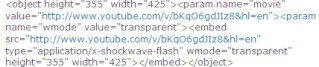
(Note - once you had put the embedded code under "Edit Html", you cant preview the video by switching it to "Compose" mode. It will give you the white space! And if you plan to write something about the video, do it under "Edit Html" mode.)
2 - Put "Label" as you wish and click on "Publish Post".
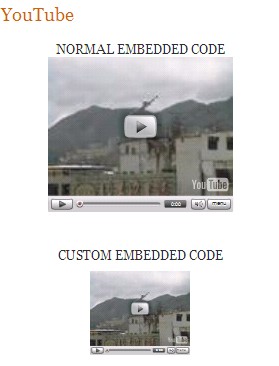
3 - The end result is shown below:-
Blogger Question: Hiding Post From Homepage
Does anyone know how to hide posts from the homepage?
Regards,
Rohit
Answer:
Finally, I got the answer for you. I have 2 opts for you to choose. Either your homepage is totally without a post except for the sidebar,header and footer or else you would like to have a front page/main page.
Here are 6 steps:-
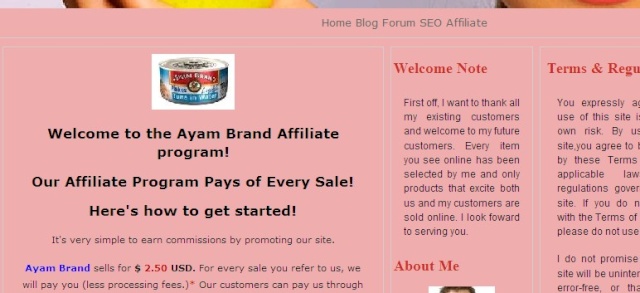
1- Go to "Setting">"Formatting", under show number of posts, change it to 0, then save it.(Note- By doing this, your homepage is left with your sidebar,header and footer)
2- Click on "Posting">"Create">"Compose", at this point, you may type in something and adding images as you always did for your blog post.
3- Once you have finished composing your blog post, click on "Edit Html" and you will be getting a set of html code. Select all by using CTRL-A and copy.
4- Go to "Layout", on the blog post, clicking "Add a Page Element" and choose for "Html/JavaScript".
5- Under "Html/Javascript", click on "Add To Blog" > "Edit Html", pasting what you have just copied before, then save it.
6- The end result is shown below:-
Hope,it helps.
Blogger Question: A separate background for my posts.
OK, here is my situation.
I created a somewhat detailed background for my blog.
But when my posts run over it you cant read it due to the black on black of the background and text colour..
Is there anyway to make a kind of grayed background around my blog post only - so when the post runs over the part of the background that makes it unreadable - there is a gray background around the post to protect it from the background?
I appreciate any help out there.
Thank you so much!
Answer:-
First off, in future you better give us your link in order for us to pay a visit. Seems to me you are having a problem with your background color instead of background image.
To answer you, what you can do is to have a transparent background for your blog post. Go to your CSS layout which is under outer-wrapper and put this code below:-
#outer-wrapper {
background-color: silver;
opacity:.85;
filter: alpha(opacity=85);
-moz-opacity: 0.85;
You may change the background color as you wish. Hope, it helps.
Blogger Question: Show "poster" who created the post
P.S. Images not working, dunno why I used the image button on here and put the URL in... please copy and paste the URL into your browser to check them out.
Answer:
If you are the only poster for the said blog, you may modify your CSS as below:-
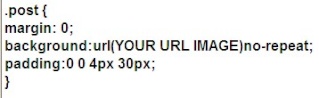
Please take note that your image size should be 20x20 otherwise you should play around with your padding margin.
Hope, it helps.
Blogger Question: Showing post authors in separate column.
Hello,
http://jbotest.blogspot.com/
Which is great. However, I'm trying to arrange the page so that the avatar images always appear flush on the left and the post text (including title, content and date) all appear to the right of this. This mock-up shows the basics of what I'm aiming for:
http://free.elixhosting.com/jollyboysouting/example.jpg
Any ideas? I'm hoping it's a quick CSS fix or two away. I'm not a coding expert, so any help would be greatly appreciated.
Thanks
Answer:
There is no method for this except by using the Blogger Labels feature. Every author should add his name as a Label in the bottom frame of the Post Editor before publishing the post. The administrator should add the Labels widget or Page Element in the sidebar. Then the author name will appear as a Label in the label widget in the sidebar.
End result will be something like below:-

Hope, it helps.